First Confirm the Candidate Actually Matches
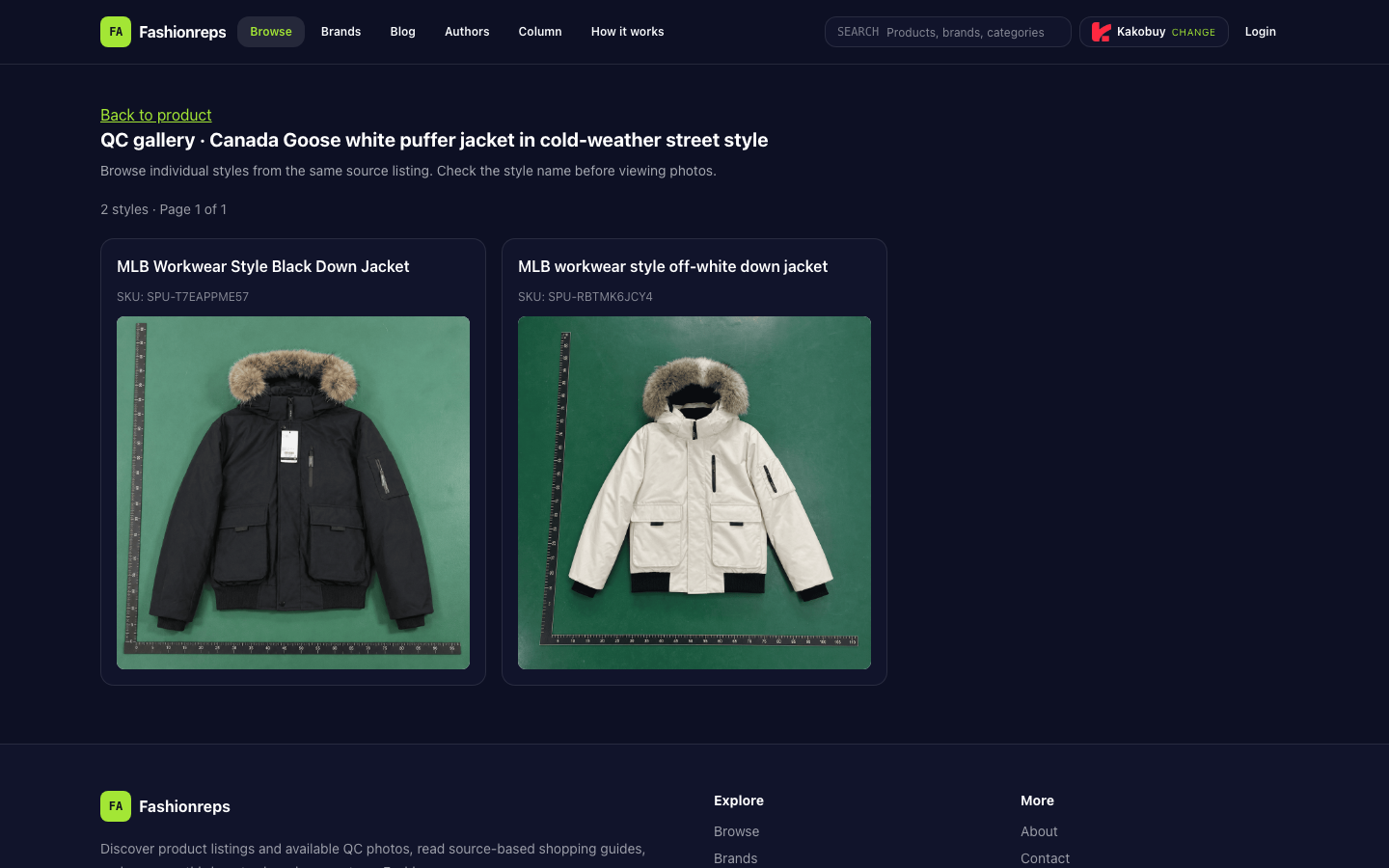
When organizing Canada Goose winter jacket candidates, the first step is not filling in prices or judging stock. It's confirming whether the brand, style, item details, and QC entry on the website correspond to each other. The currently verifiable QC page title points to "Canada Goose white puffer jacket in cold-weather street style," but the two style names shown on the page are "MLB Workwear Style Black Down Jacket" and "MLB workwear style off-white down jacket," with SKUs SPU-T7EAPPME57 and SPU-RBTMK6JCY4.
This means the page can serve as a sample for recording QC entries, but current evidence is insufficient to confirm the two styles are Canada Goose items. When recording, keep this inconsistency and do not directly mark them as verified Canada Goose candidates, nor infer price, stock, size availability, or quality conclusions from them.

The image is a schematic of the website QC catalog page, not physical evidence or a tested conclusion.
Website Suits Verifying a Single Candidate
The website page is suitable for completing a detailed check of one specific candidate. After opening the target catalog or product page, check in this order:
- First look at the page title, brand name, and style name to confirm the page topic matches the candidate.
- Check if the item details contain any recognizable SKU, color, or other identity fields.
- Check whether the size field actually appears. If no size information is seen, record as "evidence pending" and do not fill in a size range on your own.
- Check whether the page images belong to this style, not other styles from the same source.
- Go to the View QC Photos or QC gallery entry and confirm the specific style and SKU the photos correspond to.
- If the page shows multiple styles, first select the exact style name, then view photos, to avoid attributing images on the same page to another style.
The currently verifiable page clearly shows 2 styles and hints to check the style name before viewing photos. It also lists two different styles and SKUs. Therefore, the existence of a QC entry does not mean every displayed style has been verified for brand, color, size, and item identity.
Google Sheets Suits Organizing and Handover
Google Sheets does not replace the website product page, nor does it replace QC photos. Its role is to put the verification results of multiple candidates in one table for filtering, deduplication, supplementing evidence, and handover.
It is recommended to record only one specific style per row, using at least the following fields:
| Field | Recording Method |
|---|---|
| Item Identity | Brand, style name, SKU; write the inconsistency if they cannot be matched |
| Color | Fill in only the color explicitly shown on the page; mark pending if missing |
| Size Field | Record whether size information appears on the page, do not speculate on available sizes |
| Product Link | Save the corresponding product or QC page URL; the system handles the link |
| QC Status | Not checked, entry exists, photos pending verification, identity mismatch, on hold |
| Pending Evidence | Write down which item is missing: brand match, size, images, or item details |
| Exclusion Reason | Record reasons such as broken link, style cannot be matched, or conflicting page information |
| Review Date | Use the actual review date; recheck after page changes |
Among these, QC status and exclusion reason should be separated. For example, if the page still opens but the style name does not match the target brand, this is not "broken link" but should be recorded as "identity mismatch" or "on hold." This way, later staff can distinguish between candidates that need reopening the page and those that need supplementing source evidence.
Division of Labor Between Website and Sheet
The website provides the original pages, images, and QC entries; the sheet organizes the verification results generated from those pages. The boundary between the two can be judged as follows:
| Task | Prioritize Website | Prioritize Google Sheets |
|---|---|---|
| View page title and images for a single candidate | Yes | No |
| Confirm whether QC entry exists | Yes | Record result |
| Compare missing fields across multiple candidates | No | Yes |
| Filter all "identity mismatch" records | No | Yes |
| Determine whether the item is actually purchasable | Needs more page evidence | Not responsible for judging |
| Save review dates and handover notes | Can view original page | Yes |
Do not write "entry exists" in the sheet as "QC passed," nor write the number of images on the page as a quality conclusion. The sheet can only reflect verified information and its limitations.
How to Record This Candidate
For the current page, it is recommended to first create two candidate rows:
- MLB Workwear Style Black Down Jacket, SKU SPU-T7EAPPME57. QC status can be recorded as "entry exists, brand identity pending."
- MLB workwear style off-white down jacket, SKU SPU-RBTMK6JCY4. QC status can be recorded as "entry exists, brand identity pending."
Neither row should be filled in as a confirmed Canada Goose item, nor should price, stock, shipping, size, or QC conclusions be added. The discrepancy between the page title and style names should be written in "pending evidence" or "exclusion reason" to avoid being mistaken for completed brand matching during later organization.
When to Pause Further Verification
In the following situations, pause the specific purchase judgment and keep only pending verification records:
- The page title, brand name, and style name cannot be matched.
- The QC photo entry exists, but it cannot be confirmed which style the photos belong to.
- The page lacks sufficient item identity fields to uniquely link the URL to a candidate in the sheet.
- Size information is missing, yet it is needed to judge suitability for purchase.
- The link is broken, redirects to another product, or the page content changes and cannot be rechecked.
Pausing does not mean the product does not exist, but rather that current evidence is insufficient to make further specific conclusions. Later, supplement the corresponding item details, brand evidence, size fields, or a valid QC page, then update the review date and status in the sheet.