Bottom Line Up Front
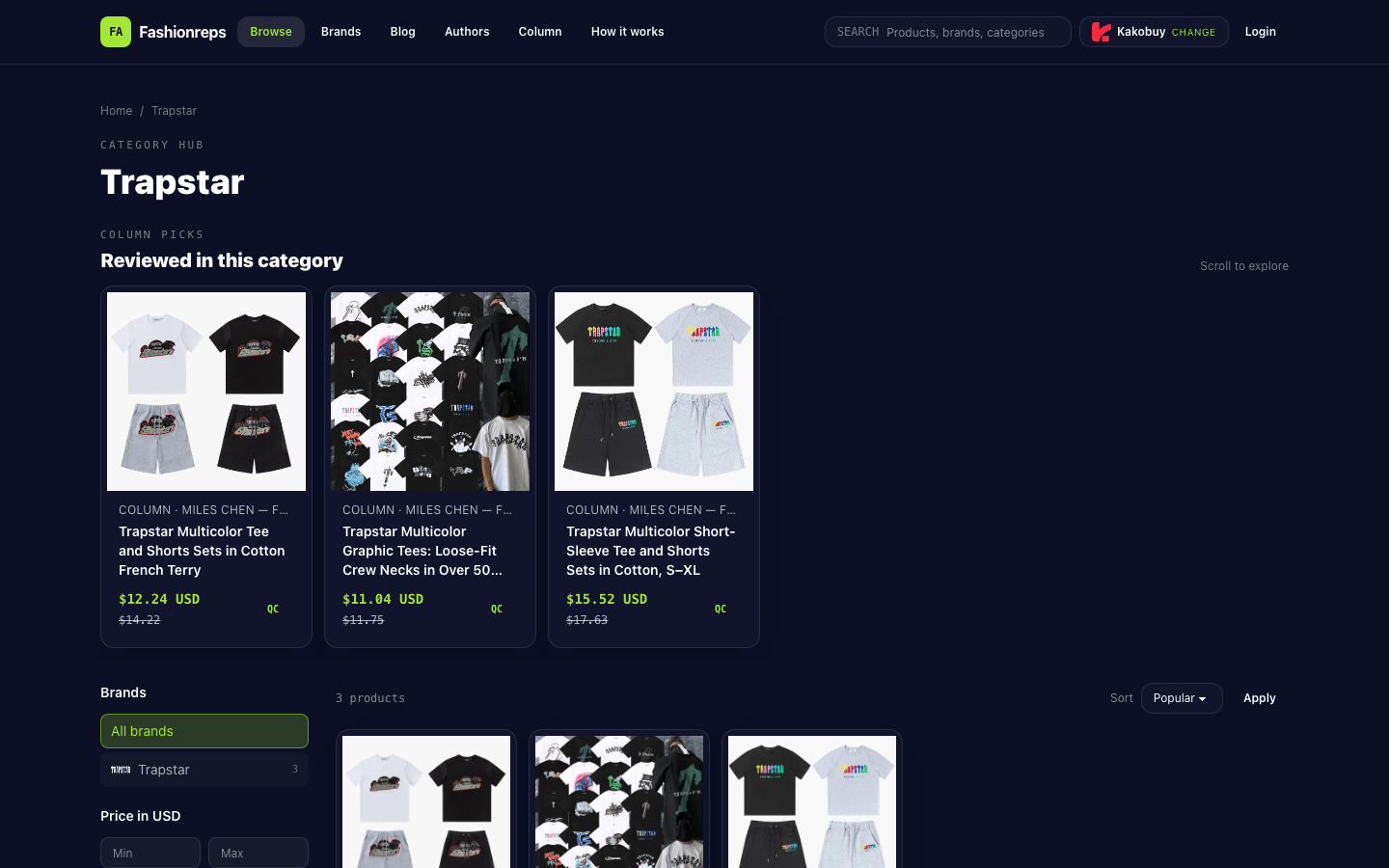
What can be verified here is fashionreps' Trapstar category page, not a confirmed accessory product page. The page shows the Trapstar T-shirts category and lists 3 clothing items: a cotton French Terry T-shirt and shorts set, a loose-fit multicolor graphic short-sleeve T-shirt, and a cotton short-sleeve T-shirt and shorts set. The page does not provide enough evidence to prove these items are accessories, nor can you judge from the category name alone that a link still points to the same product.
Therefore, the right approach is not to record the category page directly as a purchasable accessory, but to first confirm whether you can enter a specific product page, then save each verification result and change in Google Sheets.
Step 1: Confirm Link Attribution from the Category Page
After opening fashionreps' Trapstar category page, first check the page title, breadcrumb path, and product card names. The current page belongs to the Trapstar category, and the page title is Trapstar T-shirts, indicating that the current directory topic is T-shirts, not an explicit accessory directory.
The page currently shows the following identifiable information:
| Visible Page Field | Currently Verifiable Content |
|---|---|
| Category | Trapstar |
| Page Topic | T-shirts |
| Number of Products | 3 product cards |
| Product Information | Name, reference price, previous reference price, QC marker |
| Page Actions | Filter, sort, Apply |
| Accessory Evidence | No explicit accessory product page found in current source |
After clicking a product card, record the following item by item:
- Full product name; don't save just Trapstar or the category name.
- Style description, such as T-shirt, set, or other explicit category.
- Color, size, or other specifications; leave blank fields that the page does not show.
- Product detail page URL, and the original URL used when entering the detail page from the category page.
- Whether the detail page title matches the category card.
- Whether images correspond to the same style, rather than judging consistency just because the brand name is the same.
- Current page status, such as opens normally, redirects abnormally, missing content, or cannot be confirmed.
If after clicking you still remain on the category page, get redirected to a different style, or the detail page lacks color and specifications, mark the status as pending review instead of treating it as the same product. The number of products, sorting position, and reference price on the category page alone cannot prove inventory or purchasability.
Step 2: Create Candidate Records in Google Sheets
Google Sheets is suitable for saving multiple check results, especially for filtering out links pending review, comparing page status at different times, and allowing multiple people to add evidence collaboratively. It cannot replace opening pages and checking images on the website, so each record should keep the original URL and verification time.
We recommend creating one row per candidate product, using the following columns:
| Field | How to Fill In |
|---|---|
| Brand | Trapstar |
| Source Category | Trapstar; also note that the page topic is T-shirts |
| Product Name | Save the full name from the category card or detail page |
| Style | Only fill in categories explicitly shown on the page |
| Color or Specification | Leave blank if the page does not show it; do not fill in on your own |
| Category Page URL | Save the page URL before entering the candidate product |
| Detail Page URL | Save the actual URL opened after clicking |
| Page Title | Record the title after opening |
| Image Correspondence | Matches, partially matches, or cannot confirm |
| Evidence Status | Confirmed match, needs review, cannot confirm |
| Page Update Date | Fill in the date each time you re-check |
| Notes | Record redirects, missing specs, or page status changes |
Do not write reference price directly as purchase price. The amounts shown on the current category page are reference prices, and previous reference prices are also shown; the source does not provide inventory, shipping, or final settlement amounts, so these fields should remain blank until corresponding verifiable information appears on the page.
Step 3: Use Filtering to Handle Abnormal Links
Once the number of records increases, you can filter for the two statuses "needs review" and "cannot confirm" in Google Sheets and prioritize checking the following situations:
- Detail page title does not match the category card name.
- The original link opens to a different style or category.
- The image pattern, color, or structure does not match the record.
- Specification fields change from having values to blank, or the page only has vague generic descriptions.
- The page cannot open, redirects repeatedly, or only has category page content.
- The page is still visible, but there is not enough information to prove the product is purchasable.
The website category page is more suitable for discovering candidate products. It provides category navigation, product cards, filtering, and sorting, making it easier to narrow down initially; Google Sheets is more suitable for saving fields, filtering anomalies, supplementing collaborative records, and reviewing history. Keep the judgment boundaries separate: the website provides current page evidence, and the spreadsheet organizes evidence. You cannot infer that page status has not changed just because a record already exists in the spreadsheet.
When to Pause Filtering
If you have not entered an explicit accessory product page, or the page title, images, and specifications cannot all correspond, pause adding that link to the accessory candidate list. The visible source this time only supports recording the Trapstar T-shirts category and 3 clothing items within it, which is insufficient to confirm that a Trapstar accessory link still points to the same product.
During review, you can keep the original record but change the evidence status to "cannot confirm" and note which piece of evidence is missing. Only after a subsequent page simultaneously provides a clear product name, corresponding images, and identifiable specifications should you change the status to "confirmed match". Even if the status is confirmed as matching, do not treat the category page or historical records as guarantees of inventory, price, shipping, or purchase.
Final Review Checklist
- Did you enter from the Trapstar category page, rather than guessing attribution from search results?
- Did you save the category page URL and the actually opened detail page URL?
- Do the product name, style, images, and specifications correspond to each other?
- Did you leave missing information blank instead of filling it in yourself?
- Did you distinguish reference price from actual purchase cost?
- Did you separately mark redirects, missing pages, and unconfirmable statuses?
- Did you record the check date for this time to compare page changes next time?
- Did you stop filtering when there is no accessory evidence, and not misrecord clothing categories as accessories?
Article Image
